
Checkout that settles on the first try.
Samurai Bypasser is a Chrome extension that reads the card fields, completes the challenge step inline and reports the gateway’s own status, decline code and charge id. Fewer stuck checkouts, fewer guessed results, nothing to migrate.
Runs inside the checkout you already open. Nothing to migrate.
Checkout · live session
One click. No redirect. Challenge settled.
Result
PASS · challenge completed
Reason
pi succeeded (frictionless)
Relay POST
sent (200)
Runs on top of
Sound familiar?
You shipped the product. The checkout still leaks.
The rails are there, not the recovery. Every bank challenge, every unexplained decline and every card typed twice is a sale you already paid to earn.
A challenge ends the sale.
The bank asks for a confirmation, the tab closes, the session is lost. Authentication is where most checkout intent leaks out.
Every decline arrives unexplained.
A failed card comes back with a code and nothing else. Without the code, you cannot tell a soft decline from a hard one.
The card fields are read twice.
Copying card values by hand is slow, error-prone and leaves the checkout in a state nobody can reproduce later.
The result is never recorded.
The settled card, the site, the plan and the outcome are gone the moment the tab closes. Nothing is left to compare against.
Stop guessing which payments fail.
Load the extension, let it run on the checkout, and every attempt comes back with the gateway’s own code and a recorded outcome attached.
Load the extension.
Unpack the folder into Chrome and enable it. It attaches to any checkout page that renders card fields, with no script tag and no server change.
chrome://extensions
  → Developer mode → Load unpacked
  → Samurai Bypasser
Let it run on the checkout.
Card fields are read from the page, the challenge step is completed inline, and the intent is polled until it reaches its final state.
Read what actually happened.
Status, decline code, charge id and relay response, per run. You see the outcome the moment the intent settles.
Pass rate
PASS
Last nine runs, one checkout
Everything the checkout leaves you to handle.
Challenges, blacklists, fraud holds, declines, results and records. Each one is a job on its own. Here they are one extension.
Payment intent
pi_3UZW0X…R6l6L
Read from the checkout
Status
succeeded
Gateway's own final state
Relay POST
sent (200)
Site, plan and card posted
3DS bypass
The issuer's authentication step is completed on the checkout's behalf, so the payment settles without a redirect.
Blacklist bypass
Payment method types and configuration details are stripped so the checkout keeps the method the card needs.
Fraud bypass
Risk checks and card three_d_secure options are dropped, so an elevated-risk card is not held back by scoring.
Decline retry
A declined intent is re-confirmed once, and the gateway's own code is reported instead of a guessed message.
Live state
Payment intent, status, charge id, decline code, ACS vendor and relay response, all read from the last run.
Trace
Five stages recorded as they happen: detect, authenticate, poll, probe and relay. Newest at the bottom.
Relay POST
A settled card is posted with its site, plan, expiry and CVV to the configured relay endpoint, and the HTTP code is shown.
Switches
Auto-run, 3DS, blacklist, fraud, retry, deny path, forced ACS failure and logging — each writes straight to storage.
What you actually see
The menu, the popup and the trace, as shipped.
These are screenshots from the current build, taken on a live checkout that settled. The menu is the full report; the popup is the same state at a glance.
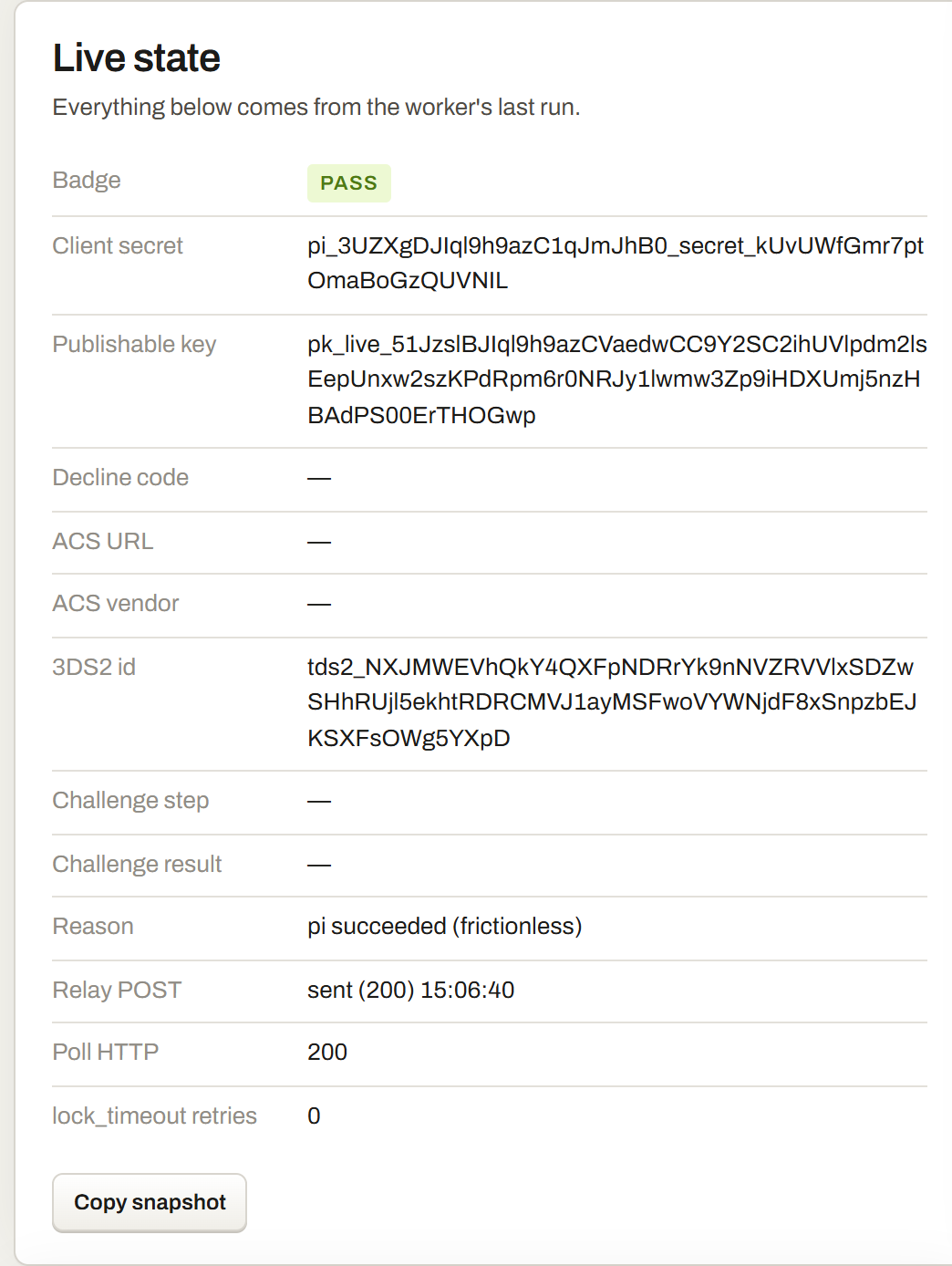
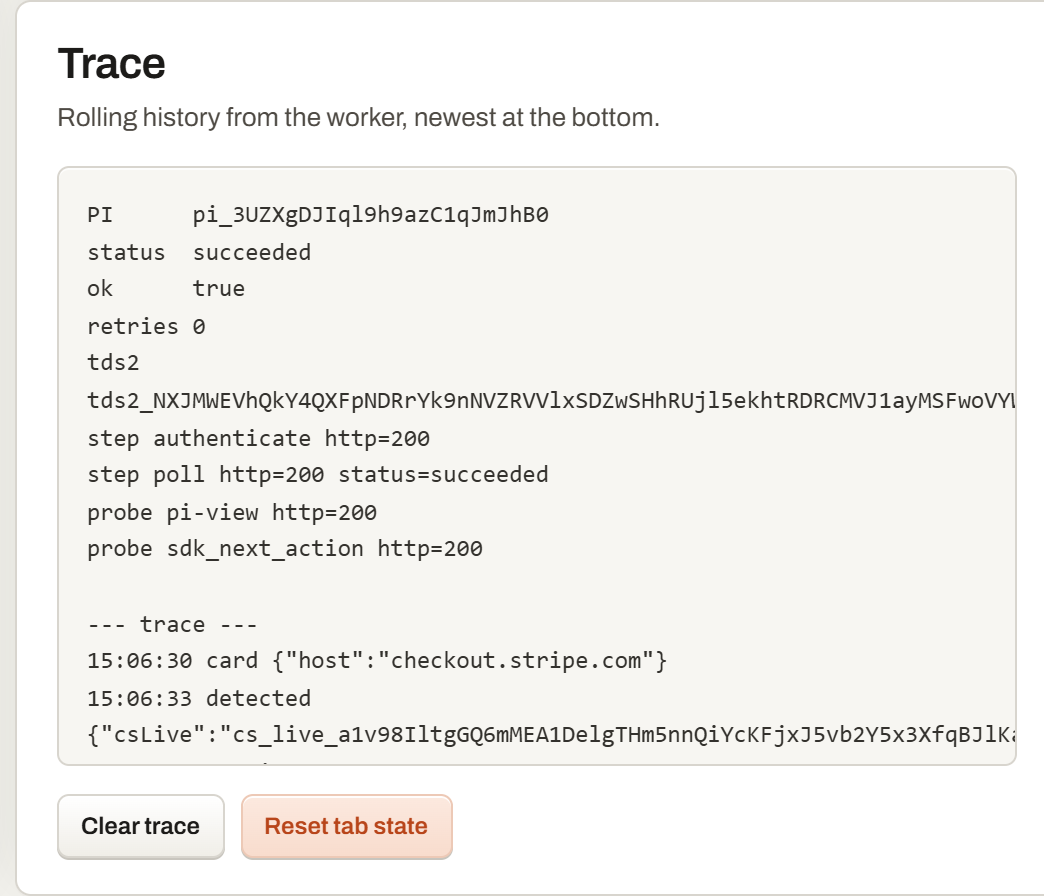
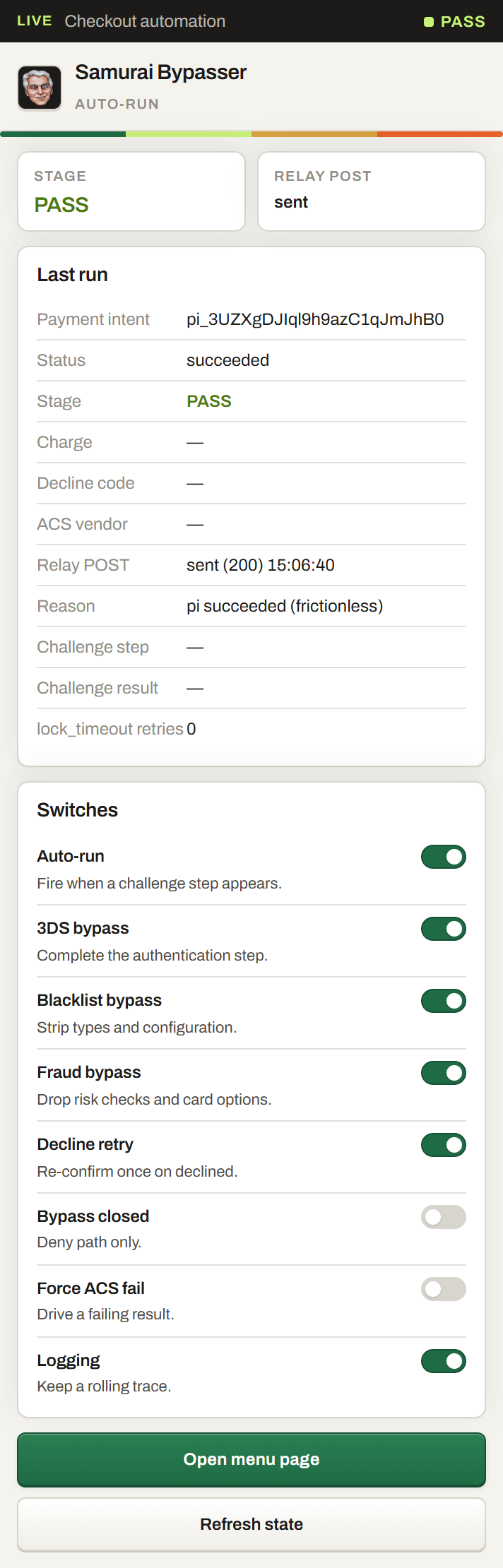
Load it in a minute. Keep the checkout you already have.
There is no processor migration, no new merchant account and no data export. The extension runs inside the checkout you already open, and removing it restores your previous behaviour exactly.
Runs with
“We’ll lose our checkout state.”
Nothing moves. Same session, same cart, same intent.
“It’ll take a sprint.”
Load the folder and turn on a switch. Usually under a minute.
“Our checkout is custom.”
It reads the fields the page renders. Your components stay yours.
Built for the checkouts that stall.
Subscription pages, storefronts and marketplaces all hit the same three walls: challenges, blacklists and fraud holds. The extension is shaped around those, not around a dashboard demo.
Challenges
A bank prompt finishes inline, not on a redirect.
The authentication step is completed while the checkout stays mounted, so the session survives.
Read more →Blacklists
Stripped types keep the method the card needs.
Payment method types and configuration details are removed before the intent is confirmed.
Read more →Fraud holds
Risk options are dropped, not guessed around.
Risk checks and card three_d_secure options are removed so scoring does not hold the payment back.
Read more →The things people ask before they install.
Something we missed? Write to us, a human answers.
01Is this a payment processor?
No. Samurai Bypasser is a Chrome extension that runs inside a checkout page. Your merchant account, your balance and your payout schedule stay exactly as they are. It changes what happens at the edge: how the challenge step is completed and how the outcome is reported.
02How long does installation take?
Load the unpacked folder in Chrome and turn on the switches you want, usually under a minute. There is no key to create and no server change.
03What happens to payments I already have?
Nothing moves. The extension only acts on a checkout page it is already running in, so customers, cards and subscriptions stay where they are.
04Does it change my PCI scope?
No. Card fields are read from the checkout itself and never leave the browser through any extension endpoint other than the relay you configure.
05Is it a bypass of processing fees?
No. “Bypasser” refers to bypassing checkout friction — the challenge step, the blacklist and the fraud hold — not to circumventing processing or authorization decisions the issuer makes.
06What does it cost?
Nothing. The extension is free to load. See the pricing page for what each build includes.
07Can I turn it off?
Yes. Remove the extension and your checkout returns exactly. Nothing in the checkout configuration is destructive, so removal is reversible immediately.
08Which stacks are supported?
Hosted checkout, Payment links, Shopify, WooCommerce, Next.js, Custom API — any checkout that renders card fields in the browser.
Two minutes from now
Load it today. Keep the checkout you already have.
One unpacked folder adds inline challenge completion, blacklist and fraud bypass, decline retry and a recorded outcome to the checkout you already run. Removing it restores your previous behaviour exactly.
- No migration, no new merchant account
- Works wherever card fields render
- Card fields never leave the browser
- Reversible in one deploy